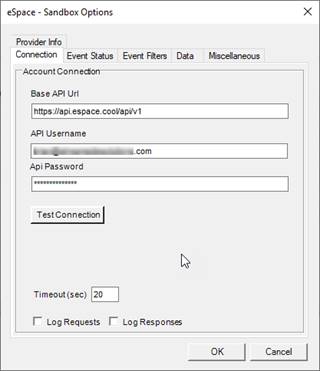
This tab defines the connection to the eSPACE Web Services. Select the COOL SPACE API for normal operation.
Base API URL
Enter the base URL of the eSPACE api. Default: https://api.espace.cool/api/v2
API Key
Enter the Api Key generated in the eSpace application
Test Connection
After you have entered the above information, this will check that you can connect to the API.
Log Requests
Check this box to enable all API requests to be logged to the Events2HVAC log file. You must have Events2HVAC logging severity set to DEBUG to see these messages.
Log Responses
Check this box to enable all API responses to be logged to the Events2HVAC log file. You must have Events2HVAC logging severity set to DEBUG to see these messages.
Note: You should turn off Log Requests and Log Responses after you have debugged your issues. Otherwise your log files will be filled with unnecessary extra data.