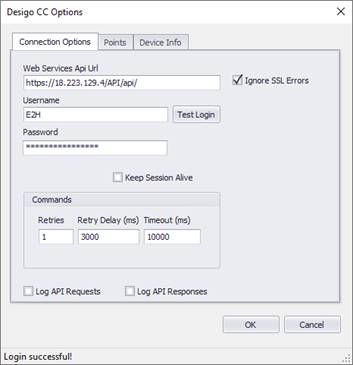
Web Service API Url
Enter the base Url to the Desigo CC API web service interface.
Username
Enter the API username.
Password
Enter the API password.
Ignore SSL Errors
Check this option to ignore any SSL validation errors when connecting to a HTTPS connection.
Warning: Ignoring SSL errors is not recommended since it essentially allows any certificate, regardless of trust or status, to be accepted and permits a man-in-the-middle attack. The best practice is to generate or purchase a trusted certificate from a trusted authority.
Keep Session Alive
Ensures the connection token is kept alive by sending a heartbeat periodically. This is not required but will prevent delays due to re-authorizing before each command.
Test Login Button
This button will attempt to login using the credentials supplied.
Commands
|
Field Name |
Description |
Range |
|
Retries |
Number of attempts to retry any failed commands |
Default = 1 |
|
Retry Delay |
Number of milliseconds to delay before each retry. |
Default = 3000 ms |
|
Timeout |
Number of milliseconds after a request is made before it fails |
Default = 10000 ms |
Log API Requests
Check this option to generate DEBUG log entries for each request from Events2HVAC to the Desigo system. This is primarily used temporarily for troubleshooting. The logger must be logging DEBUG events for this data to show up in the log files.
Log API Responses
Check this option to generate DEBUG log entries for each response from the Desigo system. This is primarily used temporarily for troubleshooting. The logger must be logging DEBUG events for this data to show up in the log files.
Note: Make sure you turn this feature off after troubleshooting so that the response files don’t fill up your hard drive.