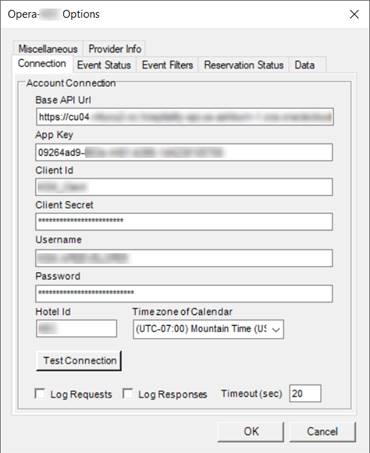
This tab defines the connection to your event calendar.
Base Api Url
Enter the api domain url that was assigned to your production site.
App Key
Enter the application key for the Events2HVAC application connection
Client ID
Enter the application client ID.
Client Secret
Enter the application client secret.
User name
Enter username for the connection
Password
Enter the password for the connection.
Hotel ID
Enter the Hotel ID for the hotel that will be accessed in Opera.
Time zone of Calendar
Select the time zone of your Opera site data. Normally this will be your local time zone.
Test Connection
After you have entered the above information, this will check that you can connect to the API.
Log Requests
Check this box to enable all API requests to be logged to the Events2HVAC log file. You must have Events2HVAC logging severity set to DEBUG to see these messages.
Log Responses
Check this box to enable all API responses to be logged to the Events2HVAC log file. You must have Events2HVAC logging severity set to DEBUG to see these messages.
Note: You should turn off Log Requests and Log Responses after you have debugged your issues. Otherwise your log files will be filled with unnecessary extra data.