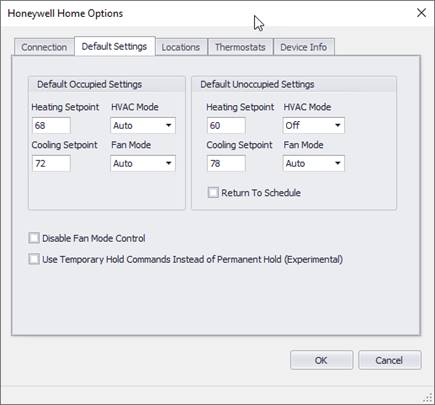
The Default Settings tab shows various default settings and parameters for a thermostat. These settings can be used for each thermostat, or individual settings can be applied to each thermostat.
Default Occupied Settings
These settings are filled in for occupied state when a new
thermostat action is defined and are used when Use Global Occupied
Settings is checked for a thermostat.
|
Field Name |
Description |
Range |
|
Heating Setpoint |
Default setting for the heating setpoint during occupied mode. |
Default = 69 |
|
Cooling Setpoint |
Default setting for the cooling setpoint during occupied mode. |
Default = 72 |
|
HVAC Mode |
Default setting for the system status during the occupied mode. |
Default = Auto AutoCool, AutoHeat, Off, Cool, Heat, EmergencyHeat, SouthernAway,DHWOFF, DHWON |
|
Fan Mode |
Default setting for the fan mode status during occupied mode. |
Default=Auto Auto, On, Circulate, FollowSchedule** |
Default Unoccupied Settings
These settings are filled in for unoccupied state when a
new thermostat action is defined.
|
Field Name |
Description |
Range |
|
Heating Setpoint |
Default setting for the heating setpoint during unoccupied mode. |
Default = 62 |
|
Cooling Setpoint |
Default setting for the cooling setpoint during unoccupied mode. |
Default = 78 |
|
System Mode |
Default setting for the system status during the unoccupied mode. |
Default = Auto AutoCool, AutoHeat, Off, Cool, Heat, EmergencyHeat, SouthernAway,DHWOFF, DHWON |
|
Fan Mode |
Default setting for the fan mode status during unoccupied mode. |
Default=Auto Auto, On, FollowSchedule** |
|
Return to Schedule* |
Checked will return the thermostat back to the scheduled setpoints. (FanMode and SystemMode will not follow schedule and should be commanded) |
Default =Unchecked |
* If you enable Return to Schedule, you should program all your scheduled periods as unoccupied so that setpoints are return to unoccupied settings after the event is over.
** Not all thermostats allow “FollowSchedule” fan mode.
Disable Fan Mode Control
In most cases, fan mode settings will remain the same for both occupied and unoccupied modes. If this is the case, selecting this will prevent the additional request needed to command the fan mode.
Note: If you have thermostats with different options and settings, your global settings might be invalid for those different thermostats. (e.g. one thermostat has heating only, and the rest have heating/cooling).
Use Temporary Hold Commands Instead of Permanent (Experimental)
If unchecked (default), a permanent hold command is sent for occupied and unoccupied control (unless “Return to Schedule” is used.
If checked, a temporary hold is sent with a “Hold Until” command set to the next scheduled command. This will allow a backup schedule in the thermostat to become active if the next command never gets sent (due to loss of communications). The thermostat display will also show how long the current setpoints will remain in effect.
Note: The temporary hold feature has not had a lot of testing so use this at your own risk. Not all thermostats support the “Hold Until” temporary hold feature.