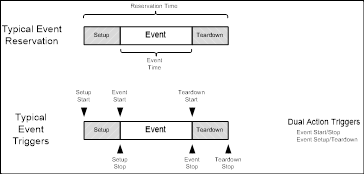
The following time designators are used in Opera event calendar:
Reservation Start Time
If there is a setup time for the event, the reservation time will be the [event start time – setup time (minutes)]. (Hotel rooms do not have a setup time)
Event Start Time
The date and time when the event starts.
Event End Time
The date and time when the event ends
Reservation End Time
If there is a teardown time for the event, the reservation end time will be [event stop time + teardown time (minutes)]. (Hotel rooms do not have a teardown time)
Events2HVAC uses event triggers to initiate actions in the BAS/HVAC systems. These triggers are dictated by the start and stop times for each event.
Special Time Handling for Hotel Room Reservations
When a reservation is made and a room is assigned, the status is “Reserved”. In this state, if there is no arrival time set, the user defined Default Arrival Time will be used. When the guest actually checks in, the status will changed to “InHouse” and the actual time of check-in will be the arrival time.
Likewise, if the guest is still booked for the room (status “InHouse”) and the departure date is the current date (without a time yet), the user defined Default Departure Time will be used. If the guest remains “InHouse” past departure time on the departure date, the end time of the departure will be moved to the following day so that occupancy state for the room will remain uninterrupted. Once the guest checks out the departure date/time will be updated.