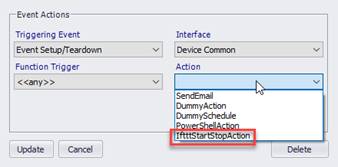
This action will send a webhook event to IFTTT based on triggered events from the event provider’s scheduled events.
This action applies to the following event triggers:
•EventStart, EventStop
•EventStartStop
•EventSetupStart, EventSetupStop
•EventSetupTeardown
•EventTeardownStart, EventTeardownStop
•ZoneFirstLastEventStartStop
•ZoneFirstLastSetupTeardown
After adding a new action in equipment manager, select one of the triggering events, along with the “Device Common” interface, followed by the “IftttStartStop” action.
Note: Only the event triggers shown can be used for IFTTT action. The action won’t be available if other event triggers are selected here.
Action Settings
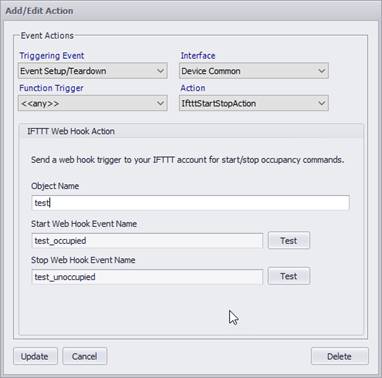
The action dialog allows you to select the IFTTT webhook event to run and the parameters to pass into it.
|
Field Name |
Description |
Range |
|
Object Name |
Unique friendly name for the device under control. |
This parameter is the prefix of the web hook name that uniquely identifies the device to the webhook. |
|
Start Webhook Event Name |
The name of the webhook event for the start command. |
<<objectName>_occupied |
|
Stop Webhook Event Name |
The name of the webhook event for the start command. |
<<objectName>_unoccupied |
Test Button
To execute the IFTTT webhook event for the start or stop command click on the test button. If the webhook runs w/o errors, a success dialog will be shown.
If an exception is thrown or some other error occurs, that message will be shown in a failure dialog.
Note: I can take several seconds for the webhook to send the action back to the device in IFTTT. You can view the activity of the applet in IFTTT.