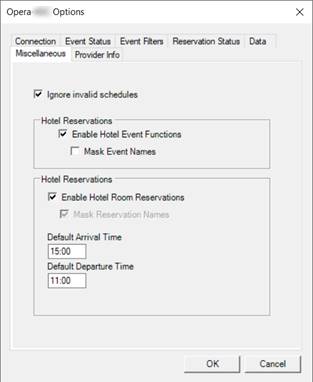
Enable Hotel Event Function
Enable to use function spaces and function events for Events2HVAC control
Mask Event Names
If unchecked, either the door card name (if “DisplayDoorCard” is enabled) or the event name will be shown. If checked, the event name will be “** private event **”
Enable Hotel Room Reservations
Enable to use hotel rooms and reservations for Events2HVAC control
Mask Reservation Names (Permanently Disabled)
If enabled, removes any personal information in the event name. Only the confirmation # will be shown.
Ignore Invalid Schedules
Checking this will ignore any schedules from Opera that have invalid start or end times. This can occasionally happen if schedules come from an external source and not entered directly in the Opera client. Events2HVAC will ignore the entire event and notify users with a warning message.
If left unchecked, an invalid schedule will fail the entire Opera query and Events2HVAC will use its local backup schedule data to control HVAC until the schedule is re-entered correctly or until the event is finished.