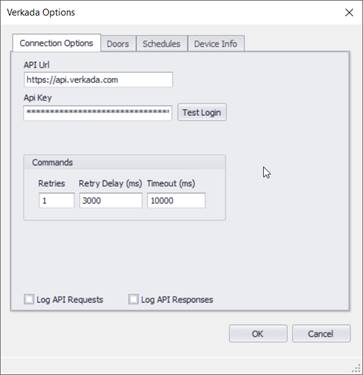
The Options tab contains all the necessary settings for logging into the Verkada system.
API Url
Enter the default API url for US
region: https://api.verkada.com
Other regions: https://api.au.verkada.com, https://api.eu.verkada.com
API Key
Enter the API key generated for the application
Test Login Button
This button will attempt to login to the Verkada system.
Commands
|
Field Name |
Description |
Range |
|
Retries |
Number of attempts to retry any failed commands |
Default = 1 |
|
Retry Delay |
Number of milliseconds to delay before each retry. |
Default = 3000 ms |
|
Timeout |
Number of milliseconds after a request is made before it fails |
Default = 10000 ms |
Log API Requests
Check this option to generate DEBUG log Doors for each request from Events2HVAC to the Verkada system. This is primarily used temporarily for troubleshooting. The logger must be logging DEBUG events for this data to show up in the log files.
Log API Responses
Check this option to generate DEBUG log Doors for each response from the Verkada system. This is primarily used temporarily for troubleshooting. The logger must be logging DEBUG events for this data to show up in the log files.
Note: Make sure you turn this feature off after troubleshooting so that the response files don’t fill up your hard drive.