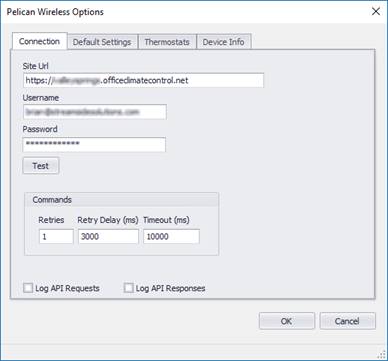
The Options tab contains all the necessary settings for logging into the Pelican Wireless system.
Site Url
Enter the URL of your site in the following format.
This should be the same domain as your site manager login.
https://<<sitename>>.officeclimatecontrol.net
User Name
Enter the user name (email) to login to the Pelican Wireless system. It is recommended that you create a separate account with minimum permissions instead of using an existing user’s account.
Password
Enter the password to login to the system.
Commands
When a command fails to execute (thermostat offline, etc.), these settings will retry the command after a delay.
|
Field Name |
Description |
Range |
|
Retries |
Number of attempts to retry any failed commands |
Default = 1 |
|
Retry Delay |
Number of milliseconds to delay before each retry. |
Default = 3000 ms |
|
Timeout |
Number of milliseconds after a request is made before it fails |
Default = 15000 ms |
Log API Requests
Check this option to generate DEBUG log entries for each request from Events2HVAC to the Pelican system. This is primarily used temporarily for troubleshooting. The logger must be logging DEBUG events for this data to show up in the log files.
Log API Responses
Check this option to generate DEBUG log entries for each response from the Pelican system. This is primarily used temporarily for troubleshooting. The logger must be logging DEBUG events for this data to show up in the log files.
Note: Make sure you turn this feature off after troubleshooting so that the response files don’t fill up your hard drive.