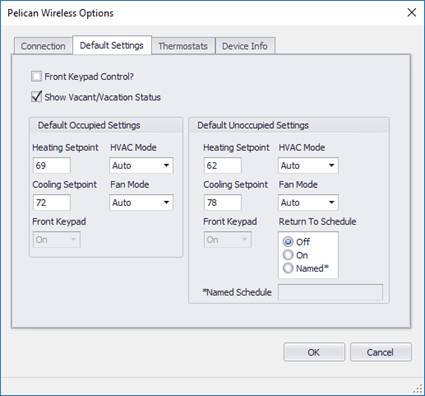
The Default Settings tab shows various default settings and parameters for a thermostat. These settings can be used for each thermostat or individual settings can be applied to each thermostat.
Front Keypad Control?
Check if you want to control the front keypad on the thermostat.
Show Vacant/Vacation Status?
If this is checked, when unoccupied mode is commanded to the thermostat, the internal status of the thermostat will be set to “Vacant”. This will show on the thermostat display as “Vacant” and in the Management Site as “Vacation”.
This is recommended since it give the user a visual when unoccupied modes are set.
Note: The Site Manager vacation mode and default vacation schedules in the thermostat may affect the thermostats during switchover to “Vacant” mode by E2H. If there is a residing vacation schedule in the thermostat at the time of switchover to “Vacant” from “Occupied”, the vacation schedules will take over not the E2H unoccupied setpoints.
Default Occupied Settings
These settings are filled in for occupied state when a new
thermostat action is defined and are used when Use Global Occupied
Settings is checked for a thermostat.
|
Field Name |
Description |
Range |
|
Heating Setpoint |
Default setting for the heating setpoint during occupied mode. |
Default = 69 |
|
Cooling Setpoint |
Default setting for the cooling setpoint during occupied mode. |
Default = 72 |
|
System Mode |
Default setting for the system status during the occupied mode. |
Default = Auto Auto, Off, Cool, Heat |
|
Fan Mode |
Default setting for the fan mode status during occupied mode. |
Default=Auto Auto, On |
|
Front Keypad |
Default setting for the front keypad during occupied mode. |
Off (locked), On |
Default Unoccupied Settings
These settings are filled in for unoccupied state when a
new thermostat action is defined.
|
Field Name |
Description |
Range |
|
Heating Setpoint |
Default setting for the heating setpoint during unoccupied mode. |
Default = 62 |
|
Cooling Setpoint |
Default setting for the cooling setpoint during unoccupied mode. |
Default = 78 |
|
System Mode |
Default setting for the system status during the unoccupied mode. |
Default = Auto Auto, Off, Cool, Heat |
|
Fan Mode |
Default setting for the fan mode status during unoccupied mode. |
Default=Auto Auto, On |
|
Front Keypad |
Default setting for the front keypad during unoccupied mode. |
Off (locked), On |
|
Return to Schedule |
Select what action you want to take for the thermostat schedule setting when the event is over. |
Off=Schedules Off, |
|
Named Schedule |
Enter the name of a shared schedule to run when Return to Schedule = Named. |
|