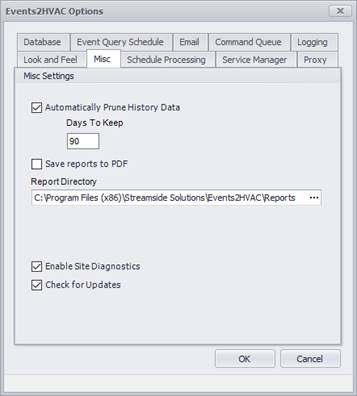
Prune History Data
This option allows users to automatically prune history data from the Command Queue. Note that history data older than the specified number of days is permanently deleted.
Save Reports to PDF
This option allows the daily reports to be automatically generated and saved to the specified folder location as a PDF file. These reports are automatically created at 12:15 a.m. each day.
Enable Site Diagnostics
When checked, it allows site diagnostics to be periodically sent to Streamside Solutions cloud. After enabling, you must go to Admin – Site Manager and register your site for data collection.
Check for Updates
When checked, whenever new software updates become available for download, a notification will appear in the Events2HVAC client. Users can also check for updates manually by clicking on Check for Updates… in the Help menu.