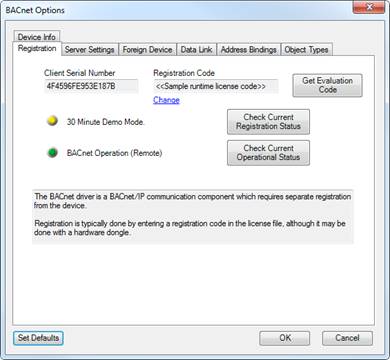
The registration tab shows information related to the registration and operation of the BACnet client driver. This device interface requires a 3rd party client license to operate outside of the evaluation mode.
Since third-party client registration is required, this information might need to be provided for each BACnet client in order generate the final license keys.
Client Serial Number
This is the unique serial
number of the client driver. This number is needed to license the BACnet
driver.
Registration Code
Shows the client
registration code that is used to register the BACnet driver. This code will
also be contained in the Events2HVAC license file.
Important: The BACnet registration code is managed by a 3rd party and is anchored to the platform that is hosting the driver. Reloading the server files to a different platform that it was originally licensed to will result in the BACnet driver shutting down after 30 minutes of runtime. Please contact Streamside Solutions to obtain a new license code for the new platform prior to making the switch.
Check Current Registration Status
This button will check the registration status and report the result.
Check Current Operational Status
This button will attempt to load the BACnet driver using the current settings. Your Events2HVAC windows service must be operating for this to be successful. The BACnet driver operates within the service process. A dialog box will show the results.