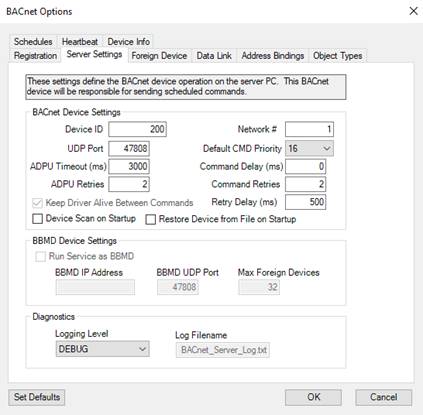
The server settings tab allows you to configure the BACnet driver settings for the Events2HVAC Windows Service that hosts the Command Queue. When the Windows service is started, the BACnet driver will begin operating using these settings. If you are viewing this window on a client PC that doesn’t have the Windows service installed (Client Only PC), then these settings will be disabled.
Important: Whenever any of the server settings are modified, the Events2HVAC_Service Windows service must be restarted on the server for the new settings to be loaded.
The main sections of the Client Settings Tab are described further below.
BACnet Device Settings
|
Field Name |
Description |
Range |
|
Device ID |
The BACnet device id of the server BACnet client. Note: This must be unique on the BACnet network! |
0 <= deviceID <= 4194303 |
|
UDP Port |
UDP port of the BACnet network. |
Default port for BACnet is 47808. |
|
Network Number |
Network number of the BACnet network. |
Default = 1 |
|
Default Command Priority |
Priority value for commanding an object. Note: Setting the wrong priority could have negative effects on the operation of your systems. |
1-16 (1=highest) 16 = recommended default Only applies to Present_Value property on commandable objects (ie. AO, AV, BO, BV, MSO, MSV) |
|
Keep Driver Alive Between Commands |
If not checked, each time a BACnet request occurs, the driver is started, the command is sent, and the driver is shutdown. Check this will start the driver when the Windows service is started and keep it running until the service is shutdown. |
Default = True (This should never be unchecked!) |
|
Device Scan on Startup |
If checked, a full device scan (global WhoIs) will be initiated upon startup. |
Default = unchecked |
|
Restore Device From File on Startup |
If checked, local device properties and points will be serialized to file and restored upon startup. |
Default = unchecked |
|
ADPU Timeout |
Time in milliseconds between retransmissions of an ADPU requiring acknowledgement for which no acknowledgement has been received. |
Default 6000. Only applies if ADPU retries > 0. |
|
ADPU Retries |
Maximum number of times the ADPU is retransmitted. |
Default = 2 |
|
Command Delay |
Number of milliseconds to wait before another command should be executed. |
Normally this can be set to 0, but if you suspect that a BACnet device you are commanding isn’t able to handle multiple commands effectively increase this delay to spread the commands out. |
|
Command Retries |
Number of times the command is retransmitted after the first failure. |
Default = 2 |
|
Retry Delay |
Number of milliseconds to wait before another command retry should be executed. |
Default = 500ms |
BBMD Device Settings
If you want the server BACnet client to operate as a BBMD (BACnet/IP Broadcast Management Device), check the “Run Service as a BBMD” check box and fill in the appropriate BBMD settings. When this option is checked, the “Keep Driver Alive Between Commands” checkbox is forced to be checked. When the server is operating as a BBMD, the BACnet driver needs to be running so other clients can register to it.
Note: the server cannot operate as both a BBMD device and a foreign device to another BBMD device.
|
Field Name |
Description |
Range |
|
BBMD IP Address |
The IP address of the PC hosting the BBMD device. |
xx.xx.xx.xx |
|
BBMD UDP Port |
UDP port of the BBMD messages will broadcast on. |
Default port for BACnet is 47808. |
|
Max Foreign Devices |
The maximum number of foreign device clients that can register with the BBMD. |
Default = 32. If value = 0, the BBMD functionality will be disabled. |
Diagnostics
The BACnet driver has its own logging mechanism. To enable logging, select a logging level other than NONE. The log filename shown will be created in the <application root> directory of the Events2HVAC application.
Note: If you enable logging for troubleshooting, make sure you disable it or lower the level after finishing troubleshooting so the log files do not grow too large.
Note: After any updates to the BACnet settings, you must restart the Events2HVAC Windows service on the server for the changes to be seen.